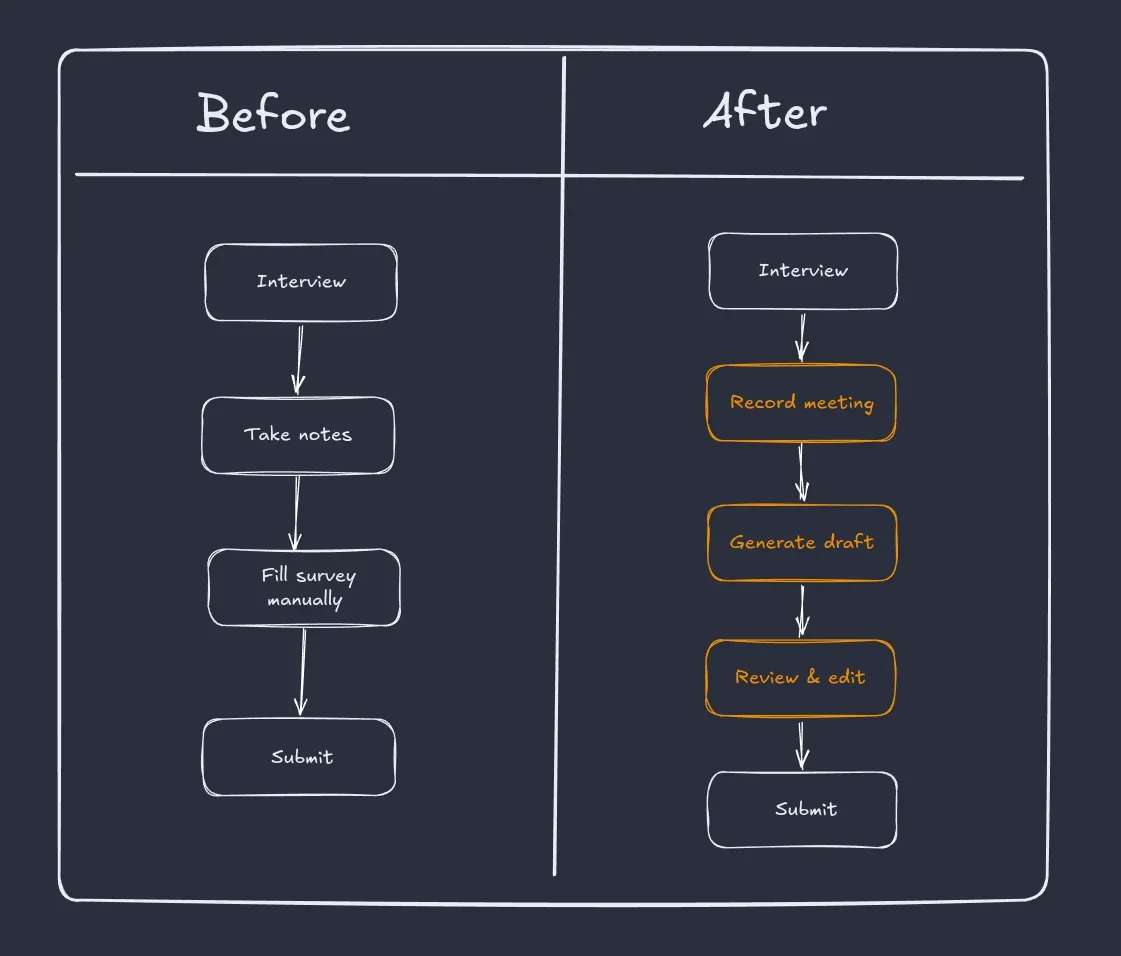
Users would meet their clients1, take notes along with the meeting, and then fill the survey responses on client’s behalf. This was time taking and error prone. One could miss noting down some points.
To improve this process, we had to reduce the manual work and let user focus on the conversation instead of taking notes.
User will meet the client and start recording the meet. Once meeting is finished and recording is stopped, audio will be processed and a draft response will be generated. Now user can edit the draft response instead of creating it from scratch.
In this post, we’ll see how I built this feature for Makerble.
Implementation
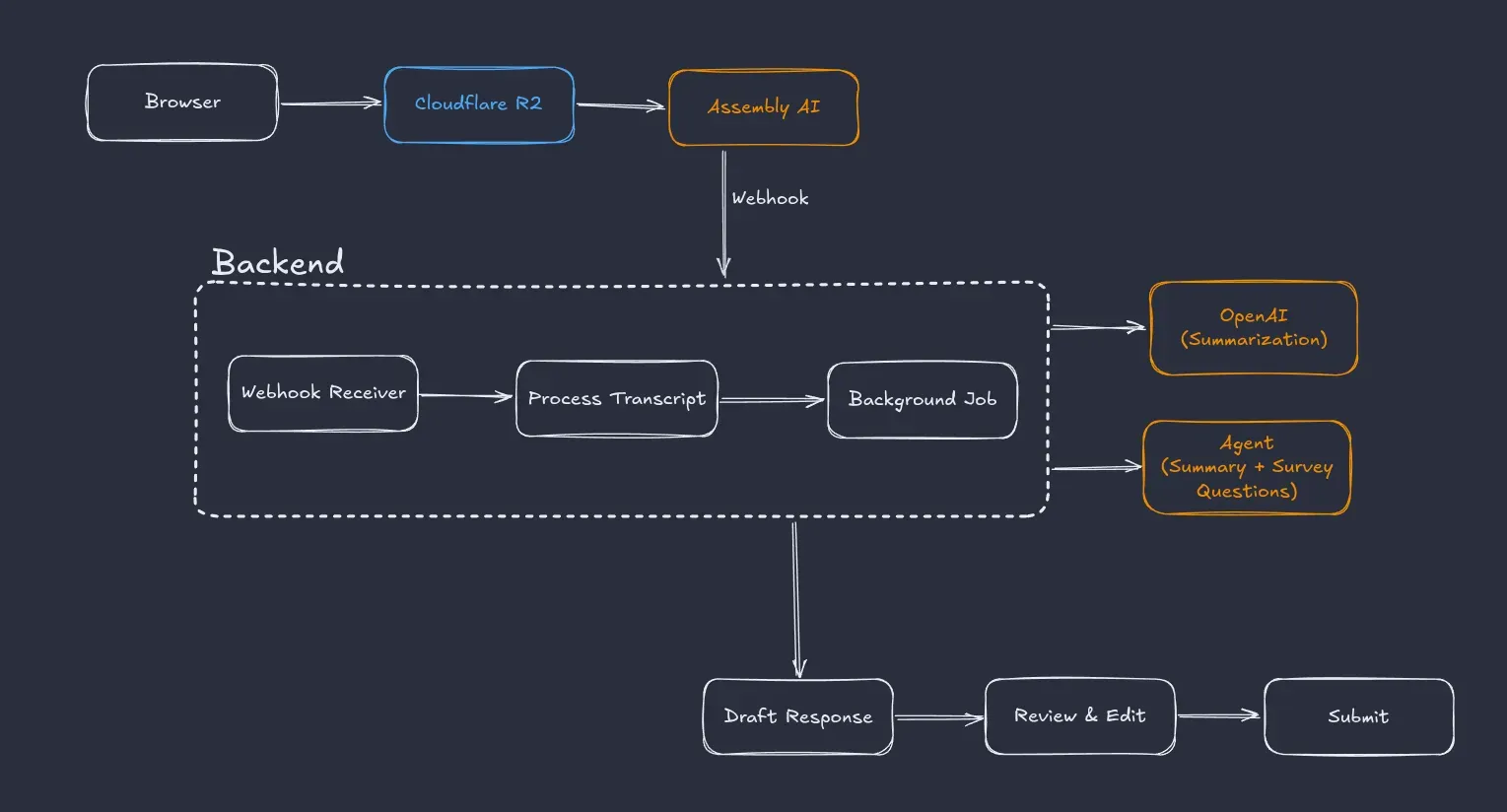
Here’s an overview of what the end result would look like.
Prototype
The audio part seemed most challenging so I made a prototype for it. I checked some local speech-to-text models and created a server that uses sherpa-onnx runtime to transcribe the audio.
It worked, but long recordings had to be split into smaller chunks before transcription. That meant handling chunking, merging transcripts, and possible loss of context.
For production, I would also have to manage concurrent requests, queues, retries, and the transcription pipeline itself. It was becoming a project of its own.
So I dropped the local processing approach.
For cloud solution, I checked these options:
- OpenAI whisper
- AssemblyAI
OpenAI still required me to split long recordings into chunks and merge transcripts back together.
AssemblyAI accepted a presigned URL directly. Once the recording was uploaded to Cloudflare R2, I only had to share the URL and wait for the transcript. This kept the transcription pipeline much simpler, so I decided to use AssemblyAI.
Now I knew how the audio would be processed. The next step was figuring out how to record it.
Record the audio
For this, I used browser’s in-built MediaRecorder API.
this.audio_chunks = [];
this.mediaRecorder.ondataavailable = (e) => {  if (e.data.size > 0) {    this.audio_chunks.push(e.data);  }};
// startthis.mediaRecorder.start();
// stopthis.handle_blob(this.audio_chunks);
In above code, we first define an array to store the audio chunk. And then an event listener to update the array. On stop, the event is triggered and the audio is uploaded to cloudflare.
This setup works, but theres a problem. It isn’t robust. The audio is stored in-memory of browser and is tied to the browser tab. If the tab is closed or browser crashes, then the ongoing recording will also be lost.
Handle Large Audio Files
To make the current setup robust, I had to preserve the recorded audio. For this, I used the timeslice parameter of MediaRecorder API. When we pass a value to mediaRecorder.start(n), it fires the data-available event every n seconds.
this.mediaRecorder.ondataavailable = (e) => {  if (e.data.size > 0) {    this.handle_chunk(e.data);  // upload immediately  }};
// start, with a timeslice valuethis.mediaRecorder.start(30000);
// on stop, upload the remaining chunk
With this, I uploaded audio chunks every 30 seconds to cloduflare.
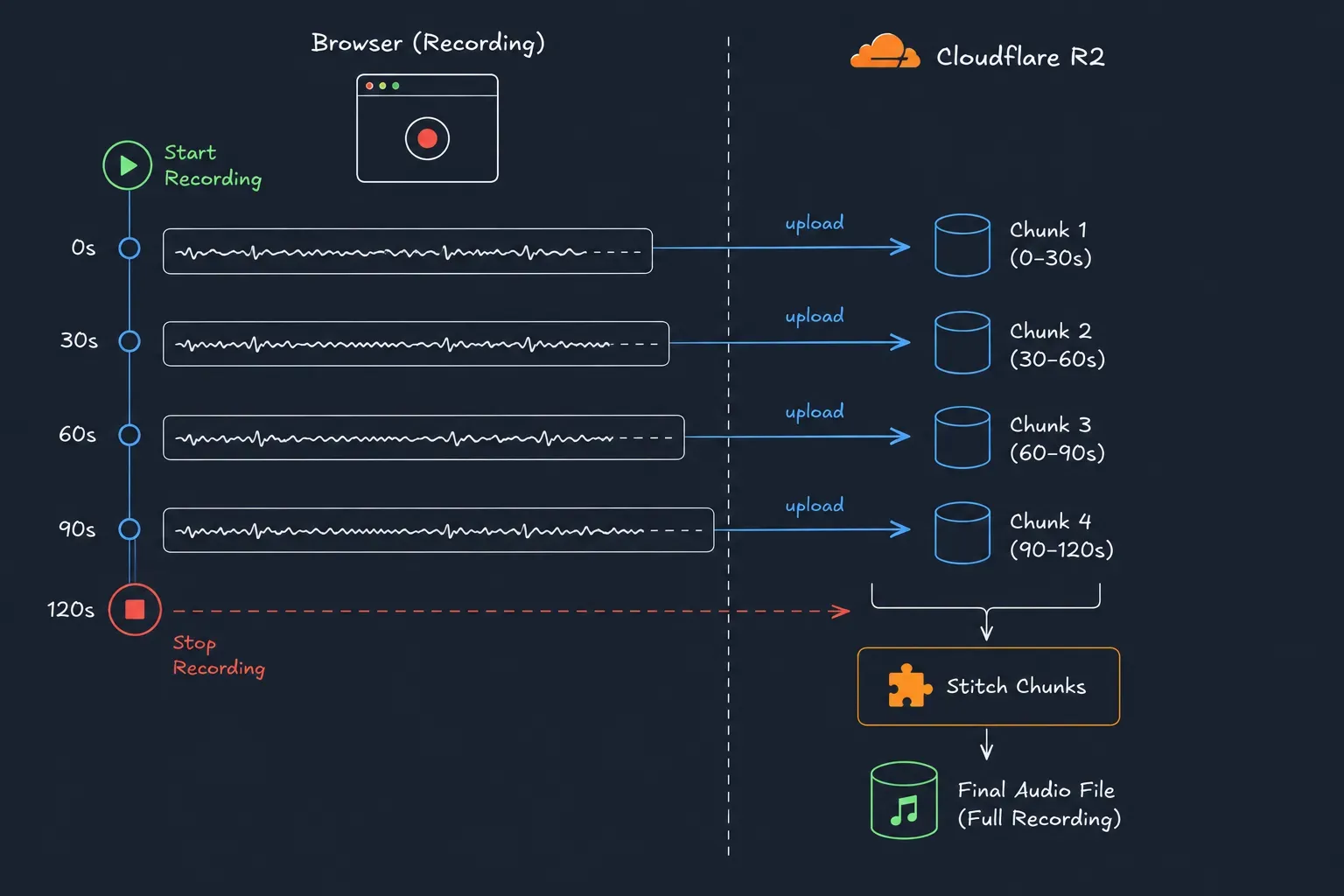
Image Credit: Artificial Intelligence
Once recording was stopped, the chunks were stitched into a single file that could be passed to AssemblyAI.
Generate Draft Response
When AssemblyAI finishes transcription, it notifies via a webhook. Once notified, server fetches the transcript and schedules a background job to summarize the transcript.
Once we get the summary, the summary is passed to an agent. The agent also has the survey questions. With it, it extracts the requirement and answers the survey responses and creates a draft response that the user can review before submition.
Challenges
Following were some of the challenges I faced while working on this feature.
Missing Headers
This occured while moving from single blob upload to uploading in chunks.
When the chunks were stitched and file was transcripted, it only had some part of the conversation. Rest all was gone. AssemblyAI logs showed success.
I checked the previous step, ie the audio file present in R2. I downloaded it and on playing it, it ran only for thirty seconds.
I downloaded the chunks. Only first chunk had audio, rest of them weren’t even playable by VLC.
Finally got the error. Headers were missing from the chunks. MediaRecorder adds headers only for the first chunk, and rest of the chunks were raw audio frames. So ffmpeg didn’t know what kind of data it is handling.
Adding the headers before the stitchind fixed the issue.
Speaker Identification
Sometimes speaker identification was not correct.
Suppose there were three speakers, then only two would be identified and the third speaker’s words would be assigned to one of the two speakers.
metadata = [ { name: 'Jared', description: 'Survey session organizer' }, { name: 'Richard', description: 'Helper to the organizer' } { name: 'Gilfoyle', description: 'Beneficiary for whom survey is conducted' }]This issue was fixed by passing metadata to AssemblyAI.
Conclusion
Users can now review and edit a draft response instead of creating it from scratch.
Before starting this project, I expected recording and transcribing audio to be the difficult part. Instead, most of the engineering effort went into making the pipeline reliable for production.
Footnotes
-
Terminology:
- Users = People who will use our application.
- Clients = People with whom our users will interact.